 AtomFit
 AtomFit
A gym log for people who lift.
AtomFit logs sets in one tap, works in a basement with no signal, asks for no account, and caps nothing you make. A numeric keypad instead of a scroll wheel, last session's real numbers already in the row, and a rest timer that keeps running with the screen off.
Free to use, with a one-time Pro unlock. No subscription, no ads, no sign-up.
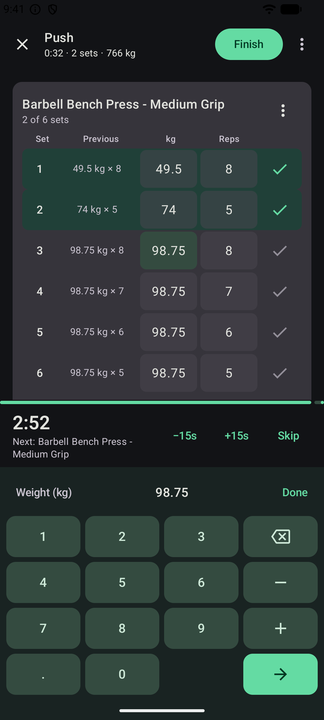
The logging screen is the app
Everything else is downstream of how fast a set goes in between two working sets.
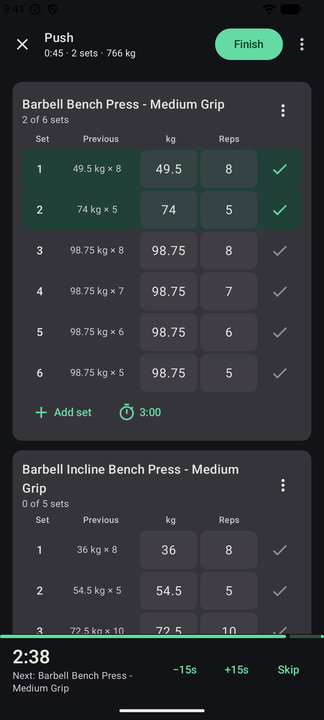
- A numeric keypad, never a scroll wheel — and the row is prefilled with what you lifted last time, not what a template hoped for.
- A rest timer that runs with the screen off and survives the app being killed. Rest per set, shorter rest after warm-ups, superset rest that waits for the block.
- A set timer for planks and carries, and intervals for EMOM, Tabata, AMRAP and circuits.
- Warm-up sets generated from your working weight, and plate maths for the bar in front of you.
- Machine taken? Swap in an alternative for the same muscle with the equipment you have.
- Drag to reorder, undo anything, and log left and right sides separately.
- Seven ways to track a movement — weight and reps, assisted bodyweight, duration and the rest.
962 exercises, and room for yours
Search by the name you actually use. Aliases are built in, so "OHP" and "military press" land on the same movement.
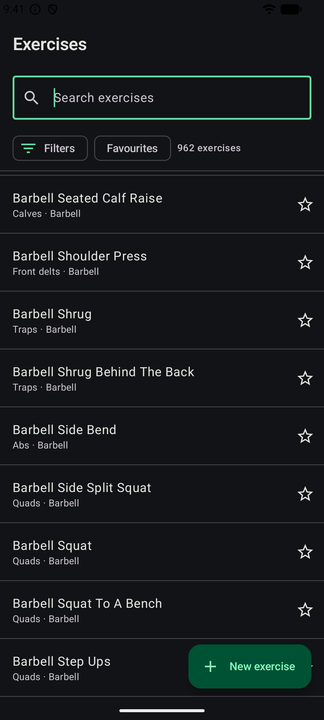
- Filter by muscle, equipment or category, with favourites and recents first.
- Grip, angle and attachment are variants — close-grip bench stays inside bench press's history.
- Custom exercises, with a photo of the machine you took yourself.
- Per-exercise weight unit, machine base weight, and bands logged by name.
- Gym profiles for the equipment each place you train actually has. Pro
Routines, and real programs behind them
A routine is a session. A program is weeks of them, with a cursor that knows what comes next.
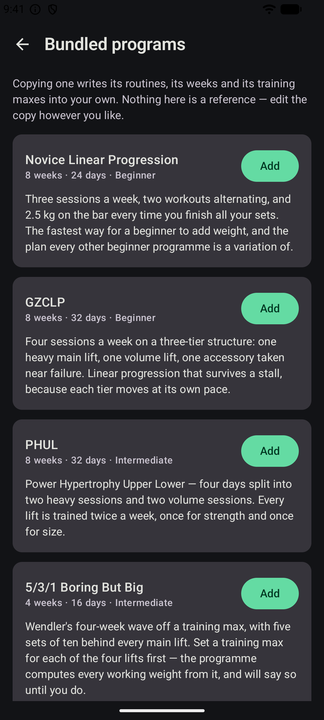
- Routines, folders, supersets and circuits, in any number.
- Nine templates to start from, including StrongLifts 5×5, nSuns 5/3/1 LP, GZCLP and PHUL.
- Copying a bundled program writes its routines, weeks and training maxes into your own — nothing here is a read-only reference.
- Multi-week schedules with deload weeks, and progression rules that raise the weight for you and back it off when you stall. Pro
The numbers you train by
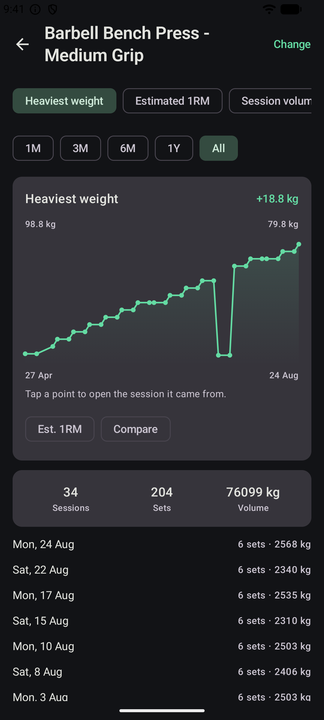
It reports what happened — 69 workouts, an 18-week streak, +18.8 kg on the bench — and leaves the motivating to you.
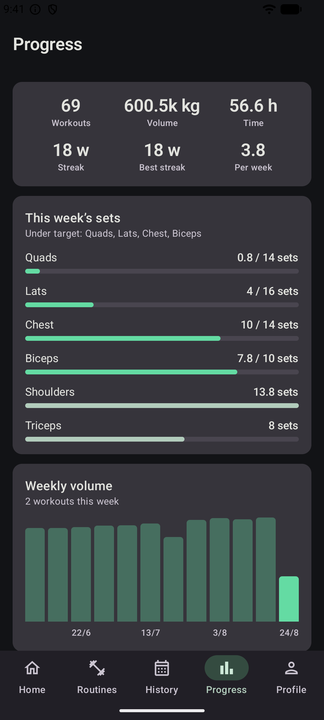
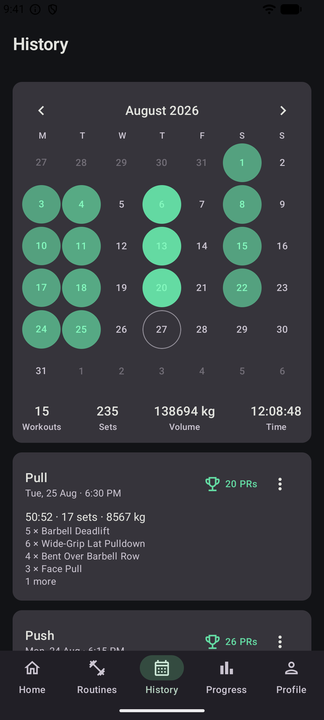
- Calendar, session detail, and a full edit of any past session with records recomputed.
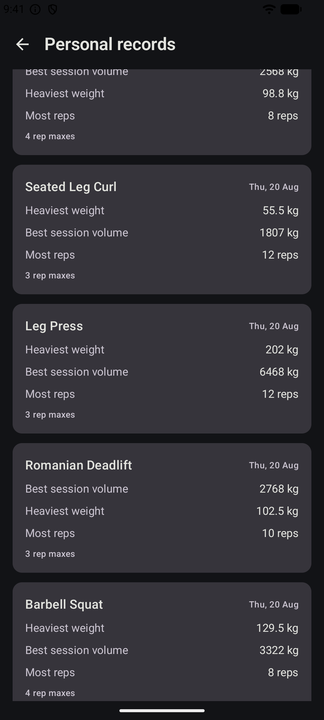
- Records per rep count, heaviest weight, best set, best volume and estimated 1RM — and strike out one you know is wrong.
- Weekly sets per muscle group against a target you set. Pro
- Per-exercise charts for heaviest weight, estimated 1RM and session volume, over any range. Pro
- Body weight, body fat and limb measurements, with BMI, lean mass and symmetry — plus progress photos side by side.
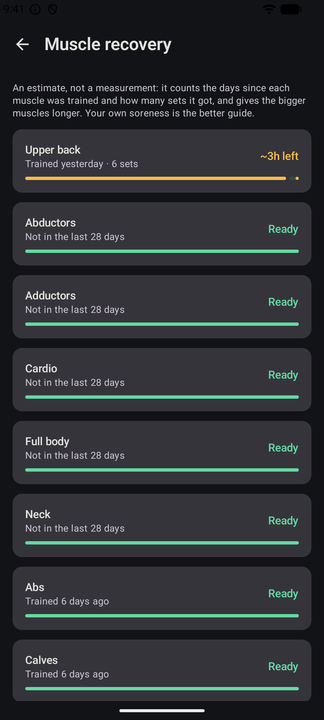
- Muscle recovery, monthly and yearly reports, goals and a calorie estimate per session. Pro
The rest of your phone
And your wrist, and your strap, and whatever you had your training in before this.
Wear OS
Start a session, tick sets off and read heart rate from your wrist, on a watch app that pairs with the phone by being the same app.
Widgets and a tile
Home-screen and lock-screen widgets, and a quick settings tile that starts a workout.
Health Connect and straps
Write sessions to Health Connect, read weight and heart rate back from it, and connect a Bluetooth heart-rate strap.
Import what you already have
An export from the app you log in today comes in whole, with a restore preview and an integrity check before anything lands.
Export, always
Full-fidelity JSON, and a session or a month as PDF, CSV or TCX. Share a session as an image, or a routine or program as a file or a QR code.
Themes and languages
Dark and AMOLED-black, Material You colour, an app lock behind your device's own, and 22 languages.
Inside the app
Screens straight off a phone, from a real imported history. The numbers in them add up.
No account, and no server of ours
Your training is a database on your phone. Sync, if you turn it on, is a file in your own Google Drive.
Offline at every moment
Not "offline-capable". Every feature that matters mid-session works with the phone in aeroplane mode, because nothing waits on a network.
Sync through your Drive Pro
The hidden app-data space only this app can read, in your own Google account. There is no AtomFit server, and there never will be.
Reports you control
Crash reports are on so a crash can be fixed. Usage statistics start off in the EEA, the UK and Switzerland, and on elsewhere. Both live in Settings › Privacy, and neither carries a workout, a measurement or an exercise you typed.
The whole account is in the privacy policy.
Free, and what Pro adds
One payment through Google Play, once. Not a subscription, and nothing that shipped free ever moves behind it.
Free
The whole log
- Unlimited routines, exercises, history and measurements
- The logging screen entire — keypad, rest and set timers, intervals, warm-ups, plate maths
- 962 exercises, custom exercises, folders, supersets and circuits
- History, calendar, session editing and personal records
- Body metrics, progress photos, widgets, Wear OS and Health Connect
- Backups, competitor imports and full-fidelity export
No ads. Nothing here is a trial.
AtomFit Pro
One payment through Google Play
- Sync across devices through your own Google Drive
- Programs and progression rules
- Per-exercise charts, and goals
- Weekly muscle targets and muscle recovery
- Monthly and yearly reports
- The full rep-max table, out to thirty reps
- Gym profiles
Bought once, held by your Google Play account across devices and reinstalls.
What this app will never do
Six promises, and they are the reason the app exists rather than decoration on it.
- No account, everThe only sign-in is Google, it is optional, and it buys one thing: the same data on another device.
- No network neededWorks with no connection, at every moment of use.
- No capsOn routines, programs, custom exercises, history, measurements or how far back the analytics look.
- No ads, no subscriptionOne optional purchase, and no advertising SDK in the build.
- Nothing taken awayNothing that has ever shipped free moves behind the price.
- Your data leaves wheneverFull-fidelity export, one tap, no account.
Questions
Do I have to make an account?
No, and there is nothing to make one with. AtomFit has no user accounts and no server. The only sign-in anywhere in the app is an optional Google sign-in, and it exists solely to reach the private folder in your own Drive that sync uses.
How does sync work with no backend?
Each device writes its changes into the appDataFolder of your own Google Drive — a hidden space only this app can read — and reads the other devices' changes back out. The merge happens on the phone. We never see the file, and deleting it in your Drive ends the whole thing without asking us.
Does it work offline?
Entirely. The database is on the device, and every screen reads from it. Sync is the only feature that ever wants a connection, and it waits until there is one.
Is Pro a subscription?
No — one payment through Google Play, bought once and restored on your next phone. The entitlement is cached on the device, so it keeps working with no connection.
Can I bring my history from another app?
Yes. AtomFit reads the exports the common gym logs produce, and shows you a preview with an integrity check before anything is written.
Can I get my data back out?
Full-fidelity JSON export in one tap, with no account and no upgrade. A session or a month can also leave as PDF, CSV or TCX, and automatic rolling backups go to a folder you choose.
Is there an iPhone version?
Not today. AtomFit is Android, with a Wear OS watch app alongside it.
Open it, and start the set.
A gym log that opens on your training, keeps time while you rest, and asks you for nothing.